Exploring fml_doc_gen
Let’s say you have the following function you want to generate the documentation for:
def square(base: int, pow: int) -> int:
    return base ** pow
But you forgot what the template looks like? Don’t worry!
This is where fml_doc_gen comes to the rescue.
To get started, simply import our package:
import fml_doc_gen
from fml_doc_gen.fml_doc_gen import generate_docstring_template

print(fml_doc_gen.__version__)
3.1.1
Simply pass your function to ours to generate the documentation effortlessly:
documentation = generate_docstring_template(square, output_file=None)
print(documentation)
    square:
    ### INSERT FUNCTION DEFINITION HERE ###

    Parameters:
    ----------

    base: <class 'int'>
    ### INSERT PARAMETER DEFINITION HERE ###


    pow: <class 'int'>
    ### INSERT PARAMETER DEFINITION HERE ###


    Returns:
    -------
    <class 'int'>
        ### INSERT ADDITIONAL FUNCTION OUTPUT INFORMATION HERE ###


    Examples:
    --------
    ### INSERT FUNCTION EXAMPLE USAGES HERE ###
Then you can copy this and make your function fully documented as follows
def square(base: int, pow: int) -> int:
    """
    square:
    ### INSERT FUNCTION DEFINITION HERE ###

    Parameters:
    ----------

    base: int
    ### INSERT PARAMETER DEFINITION HERE ###


    pow: int
    ### INSERT PARAMETER DEFINITION HERE ###


    Returns:
    -------
    int
        ### INSERT ADDITIONAL FUNCTION OUTPUT INFORMATION HERE ###


    Examples:
    --------
    ### INSERT FUNCTION EXAMPLE USAGES HERE ###

    """

    return base ** pow
This is just what you needed, right?
But wait—there’s more! You can even save the generated documentation to a file.
Simply pass a file path to the previous function:
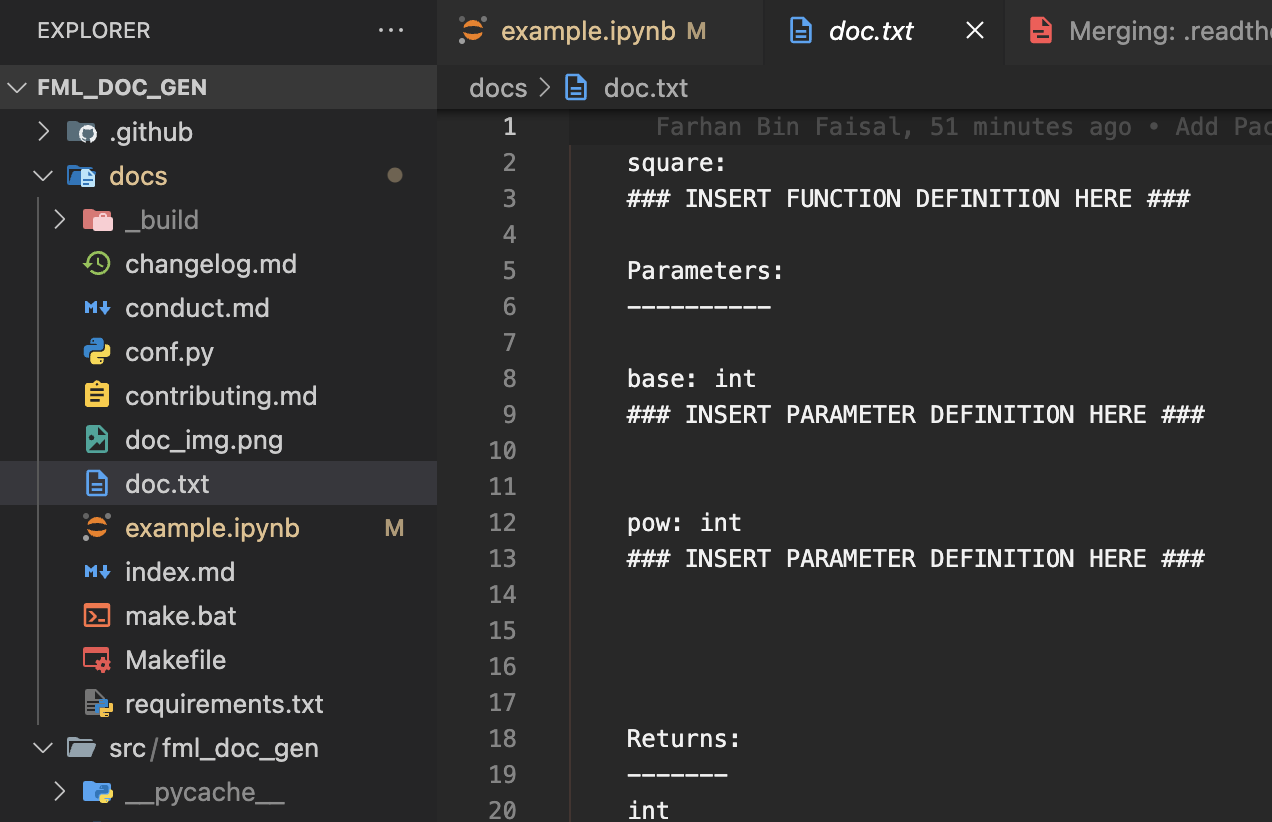
documentation = generate_docstring_template(square, output_file="./doc.txt")
print(documentation)
    square:
    ### INSERT FUNCTION DEFINITION HERE ###

    Parameters:
    ----------

    base: <class 'int'>
    ### INSERT PARAMETER DEFINITION HERE ###


    pow: <class 'int'>
    ### INSERT PARAMETER DEFINITION HERE ###


    Returns:
    -------
    <class 'int'>
        ### INSERT ADDITIONAL FUNCTION OUTPUT INFORMATION HERE ###


    Examples:
    --------
    ### INSERT FUNCTION EXAMPLE USAGES HERE ###
Even if you don’t have the output file, we will create it for you.
Unsure about writing documentation? We’ve got you covered!
Follow the steps below to setup openAI.
Then Simply pass the auto_generate parameter to our function, and we’ll create the documentation for you automatically.
Step 1: Create an OpenAI Account
Sign up for an OpenAI account if you haven’t already. You can do this here:
🔗 OpenAI Sign Up
Step 2: Obtain Your API Key
Log in to your OpenAI account.
Navigate to the API Keys section.
Generate a new API key.
Copy the key and store it securely.
Step 3: Store the API Key in a .env File
In your project root directory, create a
.envfile if it doesn’t already exist.Open the
.envfile and add the following line:OPENAI_API_KEY=your-api-key-here
documentation = generate_docstring_template(square, output_file=None, auto_generate=True)
def square(base: int, pow: int) -> int:
    """
    Square:
    This function returns the base raised to an integer power.

    Parameters:
    ----------

    base: <class 'int'>
    The base number that would be raised to a certain power. This should be an integer.

    pow: <class 'int'>
    The power to which the base number would be raised. This should be an integer.


    Returns:
    -------
    <class 'int'>
        The result is an integer that is the base raised to the specified power.


    Examples:
    --------
    Here are a few examples of function usages:

    square(2, 3)
        Returns: 8
        Explanation: 2 raised to the power of 3 equals 8.

    square(5, 2)
        Returns: 25
        Explanation: 5 raised to the power of 2 equals 25.

    square(3, 0)
        Returns: 1
        Explanation: Any number raised to the power of 0 equals 1.
    """

    return base ** pow